How To Install Khmer Without Jailbreaking On Your iOS 7 Device

Installing Khmer Unicode is very straightforward on iOS 7 this time. Even though we can install Khmer on our iDevice doesn't mean it will be fully functioned so we need to be patient to let our hard-working Khmer developer to make it better and better.

Things you need to do are :

1. Open Safari Browser on your iOS 7 Device and click on one of your preferred font style

Go To This Link

https://www.dropbox.com/sh/g9u41v35qpi0pqi/JdlR7EUWdH

Chose whatever font you preferred

Then Download and Install it


Make Sure U Liked Our Facebook And Follow Our Twitter Profile If You Enjoyed This Post Please Take 5 Seconds To Share It And Like It Thz

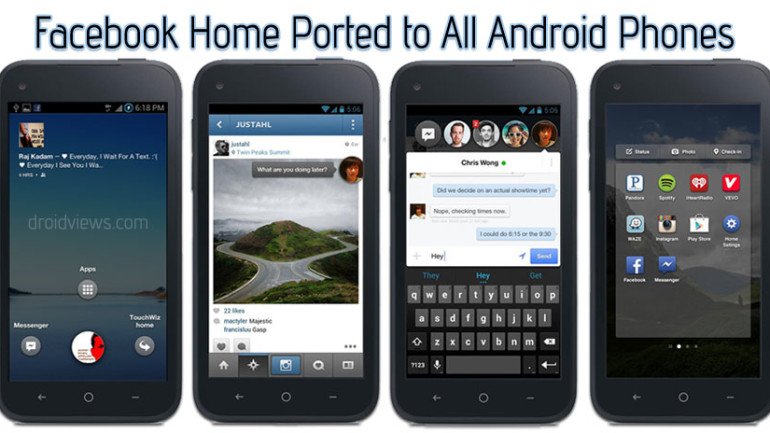
Download Facebook Home For All Android Phones [APP]


Facebook-Home-Android-App
You might like it or hate it, but this does not stop our developers to port the Facebook Home app to all Android devices. Yes, you heard it right! It’s happened so early as the Facebook Home hit the market just yesterday for a small bunch of high-end devices like  HTC One, One X, One X+, Samsung Galaxy S3, S4 and Note 2.
Facebook Home is the most hyped app for Android with a very poor rating at the Play Store. It really sound weird that an app everybody is talking about since its release gets just a below average rating of 2.5 out of 2,210 user reviews. Such reception might make Facebook concerned about the treatment the first Facebook phone, the HTC First, would receive.
Anyways, what Facebook could not do, by making the app available for all phones, has been achieved by XDA member theos0o who has made the new Facebook Home app to work on almost all Android phones. The Apk files do not require any root permission and drills like pushing the apps to System/app or flashing via CWM. The can be installed like a normal app on both rooted and unrooted Android devices.
I do not know if this news is exciting for all or not but if you a hardcore Facebook fan-boy, this is just for you. As for myself, I do not like it that much because I want a phone with Facebook, not a phone with just Facebook.

How to Install:

  1. Download the .rar and .apk files from below. Extract the rar file to find 2 apk files.
  2. If you have Facebook app pre-installed  on your device, uninstall it first.
  3. Copy the three apk files to your device.
  4. Go to device Settings> Security and check the “Unknown Sources” option.
  5. Now install the three apps, and reboot the phone (optional).

Downloads:

.
source: xda


Make Sure U Liked Our Facebook And Follow Our Twitter Profile If You Enjoyed This Post Please Take 5 Seconds To Share It And Like It Thz

Samsung Galaxy S4 To Be Launcher At March 14


There is no doubt that the Samsung Galaxy S4 / IV will be officially unveiled next month, on March 14.
What’s still not confirmed – among many other things – is the nature of the processor inside the new Galaxy.
Well, Taipei Times reports that, according to JP Morgan Securities, the S4 will likely have a quad-core Qualcomm Snapdragon 600 processor in the US, and an eight-core Exynos 5 CPU in Europe (the Exynos 5 Octa was officially announced by Samsung in January).
It wouldn’t be the first time when Samsung does something like this, as the Galaxy S III came with different processors, too: dual-core Qualcomm MSM8960 Snapdragon in North America, and a quad-core Exynos 4412 in Europe and Asia.
Manufactured using 28-nm process technology from TSMC (Taiwan Semiconductor Manufacturing Company, Limited), the Qualcomm Snapdragon 600 is also powering HTC’s latest flagship, namely the HTC One (aka M7). As for the Samsung-made Exynos 5, this will probably be also used in the 6.3 inch Galaxy Note III.
The Galaxy S4 will run Android Jelly Bean, and should feature a 5 inch Super AMOLED display with 1920 x 1080 pixels. It’s going to be Samsung’s first Full HD smartphone. The South Korean company hopes to sell at least 100 million units around the world.

Via Phone Arena


Make Sure U Liked Our Facebook And Follow Our Twitter Profile If You Enjoyed This Post Please Take 5 Seconds To Share It And Like It Thz
What Is Google Glass ?


I’m sure by now, most of us have heard of the potential Google Glass has. In the video you see a few people going through everyday routines while others put it on for more extreme stuff like skydiving.
On their head, is the wearable gadget that gives you the first-person’s view of the experience, made possible by you guessed it, Google Glass.
Glass Sessions
While Google Glass is still currently a developer’s toy, who has the time to wait until it becomes an item for the masses? So we did a little digging, got our fingers dirty and found 10 things you can expect from this high-tech eyewear.
We’ll talk about its hardware, what it’s capable of doing and how it’ll do it. Be prepared for the future as you might see many people wearing the Google Glass when it’s released.

1. Tiny (But Powerful) Hardware

It’s amazing how the Project Glass team has managed to squeeze all of its features into a tiny ‘computer’ supported on a lightweight yet strong frame.
Glass Flexibility
Google Glass is packed with Bluetooth, Wi-Fi, GPS, speakers, a camera, microphone, touchpad andpossibly a gyroscope that detects head-tilts. Then there’s the main piece, a tiny screen the size of your finger, that shows you all the information you need at your finger tips.
Glass Prototype
(Image Source: The Verge)
You can tell by the prototype that the design and engineering team have done a great job cramping everything into the current Glass design: a wearable, non-intrusive gadget that doesn’t get in the way of daily life.

2. Heed My Command!

Well, all that hardware is put to good use: Google Glass has voice input, which makes everything a lot more interesting. The built-in microphone combined with Google Now connects you directly to the search engine.
You activate Google Now by saying "Okay Glass" then send a command or question. Tilting your head up does the same thing.
Glass Voice
You can take a photo or record a video, all by just saying the command for it – more on that, later. On the right, is a touchpad where you can swipe through, to get to menus; tapping, registers your selection.

3. Life Pauses For No One

Google Glass users can now live in the moment, and keep that memory in pictures or videos. No more foraging around for a camera, tuning the settings of your photo apps, and letting the moment go by without a single snap. Just say, "Take a Photo" and your view at the moment is captured, hands-free. Imagine the possibiltiies.
Glass Taking Picture
Other than photos, you can do the same with videos, which spells opportunities for extreme sports, real-life tutorials and more. Of course, picture quality coming from a device this small would not be comparable to a DSLR camera, but oftentimes, you’d rather not lose out on the moment.

4. Always On Call, Literally

With Glass being able to record videos, it can also act as a webcam with the data connection from your home or smartphone. You can use Google Hangout for a group conference, and still do what you need to do without being confined to a desk.
Glass Handsfree
The powerful voice input feature also allows you to dictate text messages, attach videos and pictures alongwith and sending it via your mobile data connection, without having to remove your phone from your pocket.

5. Never Get Lost Again

Since it’s built with a GPS chip, it’ll be able to help you navigate, with help from Google Maps. This will take away the need to look down at your smartphone and it will be especially handy when you are driving, when you’re walking through crowded streets or when you’re hiking through the countryside.
Glass Navigation
Travellers, backpackers and even long distant cyclists won’t have to stop and check on where they are. In fact, this is the perfect example of augmented reality.

6. Blend In With The Locals

If you have read this recap on Awesome Things Google Search Can Do For You, know that you can do all of this on Glass as well. What’s the difference? Think about travelling and visiting a place where you don’t speak the local language.
Glass Translate
You can now convert the currency rate, understand the measurement system (metric or not), or translate your questions and their answers on the spot. Get the fun facts, best drinking spots, and gain access to the local secrets when you are still there, not when you are back in your apartment looking through vacation photos.

7. Live From The Field

Live information that is shown to you would come from the predictive software of Google Now. On Android’s Jelly Bean, Google Now knows when you’re leaving your home for work and can warn you of bad traffic before you get stuck in it.
You can also set your favourite sports team and it’ll give you the latest news, scores and updates from the team, whenever they play.
Glass Information
All those features are available on Android, but with Glass, you can skip checking your device and just get it shown to you as and when it happens, or as news feeds. Google Now cards also shows you your boarding pass, next appointment, hotel or restaurant reservations, reminders for important birthdays and events in your calendar.

8. OS Compatibility Not An Issue

Google Glass works not only with Android phones but also with the iPhone, according to this report. Apart from the GPS chip inside, Google Glass is dependent on the Wi-Fi or mobile connectivityto deliver its features. It is only fair game it if is available like any third-party accessory.
Glass Notification
When paired up with your smart device, it can show social network notifications and let you communicate via the same channels as you would on the computer. This removes the need of looking at your smartphone constantly, giving you more time to concentrate on the task at hand.

9. Time For A Make-Over

What is high tech without a sleek and cool design? Google Glass weighed an astounding 8 poundswhen it first was announced more than a year ago, but now is seeking to receive nods from the fashion industry.
Already lightweight, and soon to be available in 5 color options (Shale, Tangerine, Charcoal, Cotton and Sky), Google Glass is set to get a make-over with help from eyewear companies.
Glass Colors
The flexibility in design is made possible with different frame and lens shapes — the computing part of Glass can be unscrewed from the current frame and attached onto another. We’re looking forward to a less cyborg, more natural feel to it. But for now, it’s wait and see.

10. Still Elusive But Almost Here

Google first made Glass available to developers during the Google I/O conference. At the time, it was priced at $1,500 and word has it that it will still be within that price range when it is finally released end of this year.
Glass
More recently, participants of the #ifihadglass competition can get an opportunity to buy Glass if they give the most creative Tweet or Google+ comment. For the rest of us, we’ll just have to wait until they iron out the rough edges before we can put on a pair.
via hongkiat


Make Sure U Liked Our Facebook And Follow Our Twitter Profile If You Enjoyed This Post Please Take 5 Seconds To Share It And Like It Thz

Facebook To Release Their New Look On 15 January 15 [Video]

Great news, the social networking giant Facebook has just teased a media event scheduled for January 15 at 10am Pacific Time. The invite graphics doesn’t reveal much besides asking the media to “come and see what we’re building”. The company has been on a roll lately, having updated its Messenger app with VoIP calling (it’s Canada-only initially) and releasing Poke, a new app which lets you send quick messages, photos or videos…
The folks at SlashGear were the first guys to report about the 15 Jan media event.
The company over the past few weeks has updated its official iOS client with new emojis and sharing capabilities, the Nearby and Photo Sync features and the ability to install third-party apps without leaving the iOS client, a feature available to all Apple developers.
Facebook has also gotten itself into hot water with users over the ambiguous terms of service suggesting it might sell your Instagrams to brands and advertisers. However, the unexpected fallout has forced it to clarify its intentions and return to the original terms of service.
Be that as it may, the Palo Alto company – which as of September 2012 has over a billion active users - is implementing new data sharing features that will pave the way to unified profiles, scheduled to go into effect January 16, just a day following the January 15 media event.
The Next Web reported that Facebook just started rolling out a nice single-column Timeline with greater emphasis on Messages, as depicted below.
According to TNW, the features are available right now for users in New Zealand, which is regularly Facebook’s first port of call for new rollouts. Author Jon Russell reached out to Facebook’s PR, but a spokesperson would only say Facebook has “no other details to share right now”.
Check out this concept video for a redesigned Facebook experience:
According to the latest official stats, Facebook as of November 2012 had a staggering 192.8 million users on Android versus just 66 million users in September 201. By contrast, Apple’s platform grew from 66 million users in September 2011 to 147.2 million as of November 2012.
So maybe and I am not sure, on Jan 15 we could see a ‘Facebook Phone’ Who knows ? So keep yourself updated with us for more information and news..
[Source
Make Sure U Liked Our Facebook And Follow Our Twitter Profile If You Enjoyed This Post Please Take 5 Seconds To Share It And Like It Thz

How To Install Khmer On Android JellyBean 4.X.X [Tutorial]


Hey guys check out this new tutorial on How To Intall Khmer On Android 4.X.X from IDG ! I know that there are many people out there curious on how to make their Android device become Khmer readable and writable. So if you are one of them then you are in the right place ! So let get to the point 


  1. Download Khmer Zip File Here
  2. Boot Into CWM Recovery 
  3. Find the .Zip file you've just downloaded
  4. Flash the file you've just downloaded 
  5. Select *go back* 
  6. Reboot Now !

Boommmmmmm, You've just done it !! CONGRAT 

HERE ARE SOME SCREENSHOTS I TOOK


DO IT ON YOUR OWN RISK
DONT FORGET TO LIKE OUR FB PAGE AND FOLLOW OUR TWITTER PROFILE


Make Sure U Liked Our Facebook And Follow Our Twitter Profile If You Enjoyed This Post Please Take 5 Seconds To Share It And Like It Thz

Download Window Phone Music Player Alike For Android [App]


noozy is a multimedia player for Android that lets you enjoy your entire music library with an excellent level of quality. The application itself has an equalizer whose goal is to leave the audio as clean as possible. noozy is undoubtedly one of the most complete multimedia players and intuitive that you can find for free on Google Play. The player has a lot of features such as support letters, and equalizer also lets you rotate podcasts. The clean interface, which is the hallmark of the tool may seem a bit confusing for people who are used to other programs more colorful. However, a few minutes to explore all the resources and realize the qualities of minimalist layout. The most amazing thing that made me switch to noozy is it’s brilliant audio filter engine delivering the most crystal clear audio possible. More to read.

noozy-Crystal-Clear-Music-Playback-With-Stunning-Audio-Engine-&-Modern-Clean-Interface-[Android]-(10) 
The music player is great because you can filter your library by artist, band, genre and give their playlist. The video player does not offer the same filters, but has a set of advanced settings that should draw the attention of the most demanding because you can customize every inch of the interface and also configure the download of covers.
 noozy-Crystal-Clear-Music-Playback-With-Stunning-Audio-Engine-&-Modern-Clean-Interface-[Android]-(8)  noozy-Crystal-Clear-Music-Playback-With-Stunning-Audio-Engine-&-Modern-Clean-Interface-[Android]-(7)
The search tool works very well, quickly locating podscasts from famous channel like Tekzilla, Destructoid and Rev3Games. Radio stations are also satisfactory, and you can find music to suit all tastes. The player also supports playback of videos and podcasts, plus connect to radios online and access a database of song lyrics. From the main menu and all submenus in the app, all the options are organized with simple titles positioned strategically on dark background. To provide more options or change the filter on a screen, just slide your finger from left to right.
noozy-Crystal-Clear-Music-Playback-With-Stunning-Audio-Engine-&-Modern-Clean-Interface-[Android]-(1)  noozy-Crystal-Clear-Music-Playback-With-Stunning-Audio-Engine-&-Modern-Clean-Interface-[Android]-(9)
Pros:
  • Intuitive and clear modern interface .
  • Equalizer with great quality.
  • Online radio support.
  • Support for podcasts.
Cons:
  • Headset control should be implemented for stock headphones.


Make Sure U Liked Our Facebook And Follow Our Twitter Profile If You Enjoyed This Post Please Take 5 Seconds To Share It And Like It Thz

Top Coming Soon 3D Games For Android [Awesome Graphic]


archane-legends-teaser-630
Every week we cover the latest Android game releases, but we thought it would be fun to have a separate column that only focuses on upcoming titles. Today we will start a new experiment called Mobile Game Trailers, where we highlight the best video teasers for new games that are coming soon to Android. Check out the clips after the break and let us know if you spot any new trailers that we should feature next week.

Zombiewood by Gameloft

Description: Introducing a hilarious dual-stick shooter with non-stop action and survival gameplay. Available on iPhone, iPad and Android this Halloween!

Death Dome by Glu Mobile

Description: No one really remembers where it all started…but before long…it was everywhere. The “M” virus… Most people who showed symptoms were dead within days…but others weren’t so lucky. Mutations were showing up all over the city. The infected were quarantined in a bio-dome force field that encased the city of Palamira. Some called it a “safe zone”, but most know it as the Death Dome. The M virus grew stronger inside the Death Dome and eventually became strong enough to live on its own without a host. Strong enough to become…The Behemoths!

Arcane Legends by Spacetime Studios

Description: Get ready for a new Action-RPG with a fun and refreshing take on fantasy in an online, multiplayer world. In a lush, beautifully rendered world, players customize their hero, collect and develop animal companions, and adventure with friends from all around the world!

Boomtime Baseball by Distinctive Games

Description: This is the original trailer for Boomtime Baseball game now available FREE on the Apple Appstore for iPhone, iPod Touch and iPad. Coming soon to Android.

Escape from Abidon by Brink 3D

Description: Chief Gurltan orders his young ork son Olic, to retrieve 10 elemental stones, that will allow the rough goats clan to control the four earth elements: Air, Earth, Fire and Water. Take Olic in this fast paced action adventure game and retrieve the 10 elemental stones.


Make Sure U Liked Our Facebook And Follow Our Twitter Profile If You Enjoyed This Post Please Take 5 Seconds To Share It And Like It Thz

Stream Video Directly From Your Computer To Your Android Devices [TIPS]


download-progress
If you are tired of connecting cable from your Android device PC each and every time you want to stream or download any media (i.e. photos, videos, music etc.) , then it's time for you to check the new software Emit. It is a real-time media" encoder, streamer and downloader that will allow you to play/new media directly on your Android phone over Wi-Fi. Transferring files via Wi-Fi seems to be the future as it doesn't have wires so you don't have to pull the plug and unplug it again. All media contents will be streamed directly from your PC (whether it's Windows, Mac or Linux – it supports all) without using your phone's own storage. Anyway you can also download time for off-line viewing. Emit is a great software indeed to access in your media files stored at your PC. If you are not familiar to this yet, then read more after the fold.
First you need to install the Emit desktop software on your PC. Download links are given below.
Download and install Emit desktop application:
Then install the Android software from the market.

How to use

Once you start your applications all computers that have Emit desktop application running should appear automatically within the application when you are on the same local network. To manually refresh and search for servers press Menu button and hit Refresh.
servers-menu
To manually add a computer to emit press the Menu button and press "Add server". Insert your server name (pick any name you want) and the IP address of the server.
manual-server edit-server
To remove/edit a manually added server press and hold on the server name under "Source" view. A popup will appear. 
Select a server under "Source" view to display contents of that server.
root
iTunes folder represents your iTunes media. Other folders are shared ones from the selected Emit server. Tap on folders to move through them and find your video or music.
 itunes-musicmovies
Tap on the video or music file. Wait for buffering to end and it will start playing!
movie
With press and hold on a movie you will get a possibility to pre-encode a movie. Pre-encoded movies will be prepared for your device and playing experience will be much better.
encode
You can find them in Encoded folder. Encoded folder is a special folder within application which can be found if you tap on a satellite icon in top menu. If you accidentally put video to encoding, you can always cancel that. Encoded videos can also be downloaded to the external storage on Android device for offline viewing. Download progress will be displayed in Android status bar. Downloader also supports cancel downloading and resuming.
 cancel-encodingdownloaddownload-progress
If you are not satisfied with video quality you can change profile or use custom values for quality. This is waiting for you in Settings and can be found if you press on Menu key.
settings

Features at a glance

  • Live encoding and streaming directly to your device. No need to wait for your video to encode entirely.
  • .srt subtitles
  • Mkv subtitles
  • Pre encoding videos and download them to the device for offline viewing.
  • Download music from iTunes. Songs will be saved to: SD_Card/Emit/Music/Artist/Album/Song.mp3
Needless to say, the speed of streaming may vary with the strength of the WiFi connection. All in all, Emit for Android brings a whole new experience of remotely playing media files from your computer onto your device that makes the years-old method of copy/pasting data in and out of your computer look like a thing of the past. The free version of the app contains ads. If you don’t want ads appearing in the top-right corner of the screen during video playback, you’ll have to purchase the paid version for a meager price of $2.50.
Watch The Video Below


Make Sure U Liked Our Facebook And Follow Our Twitter Profile If You Enjoyed This Post Please Take 5 Seconds To Share It And Like It Thz

World-E A Robot Which Is Built By Khmer Students

Last weekend’s Barcamp, hosted by the University of Puthisastra, was a testament to the Kingdom’s continued growth in the field and a chance for members of the local tech-community to plug in and exchange ideas about the future. Here are some pictures :

This Robot looks like Wall-E, but they named it World-E


Make Sure U Liked Our Facebook And Follow Our Twitter Profile If You Enjoyed This Post Please Take 5 Seconds To Share It And Like It Thz

How To Repair Your Internet Connection Yourself [Window]


Internet is the biggest source for any kinds of information and knowledge these days. Currently, we rely on the internet to solve the most diverse subjects. When the connection is not made, either because of your computer problem or due to problems in the service provider, chaos ensues, and takes patience to solve what went wrong. Complete Internet Repair is a simple program for Windows that will help you to solve connectivity problems on your computer. With it, just select the option that needs to be resolved and click GO to get it to work, keeping all the access information when you need it. In addition to storing reports of the tasks performed (So that you can revert changes in case something goes wrong), it still works quickly, solving the most common connection problems. More to read.
Show Full Features
Fix-Internet-Connectivity-Problems-&-Repair-Internet-Explorer-Via-Complete-Internet-Repair-For-Windows
Complete Internet Repair software is a simple and easy to use application that will help you to solve connectivity problems on your computer. With it, just select the option that needs to be resolved and click GO to get it to work, keeping all the access information when you need it.
Fix-Internet-Connectivity-Problems-&-Repair-Internet-Explorer-Via-Complete-Internet-Repair-For-Windows-(2)
You can keep log of your changes done via Complete Internet Repair. To do so, just Enable Logging from Preference under Settings. By default it is enabled. You can also set maximum size for log file from here.
Complete Internet Repair is a portable freeware software and works on Windows 7, Windows Vista and Windows XP.


Make Sure U Liked Our Facebook And Follow Our Twitter Profile If You Enjoyed This Post Please Take 5 Seconds To Share It And Like It Thz

Fix Your Computer And Make It Faster With Auslogics Registry Cleaner


Windows System Utility tool developer. Auslogics Registry Cleaner is a freeware tool comes for them which is a small and effective registry cleaner small to help you to you keep your computer running properly. There’s many reason for a PC slowing down. Most of the time we pass the guilt to Virus. But virus isn’t the only reason behind it. Each time to perform any action in you computer, it let’s lot’s of empty and fragmented data in registry which is one of the reason why your PC is slowing down. So what’s the solution to prevent registry errors? It’s almost (or completely) impossible to manually clean your registry because of complexity and constantly updating data. The solution is to let a good registry cleaner to take care of repairing the errors and invalid entries in Windows registry and that way you can make your computer to work properly and some of its problems have been solved. There’s a lot of Registry Cleaner tool available in the market. While most of them are paid or demo, it’s quite hard to find a free one. Also as it is a system tool and any error can cause major problems to your system, you must use a reliable one. Auslogics Registry Cleaner is a great way to get of those errors effectively. The program is completely free, reliable (it provides complete backup each time you made any change with this tool) and easy to use even for those who do not understand registry records. More to read.
To get started with Auslogics Registry Cleaner, first download the installer package and then install it. While installation, it will try to install a browser toolbar and set your homepage to Ask.com. While this is unnecessary, you can uncheck those options during installation.
Fix-Registry-Errors-To-Make-Your-Windows-Faster-With-Free-Auslogics-Registry-Cleaner-(6)
To begin cleaning process with Auslogics Registry Cleaner, you have to let it scan your system for registry errors. This can be done in two ways, one marked as Basic and other as Advanced. The basic options have everything to meet an average users need. If you PC is performing normally or you are getting only slight problem, scan and repair with Basic option is recommended. But if your PC is having lots of problem or if you think you can manage with advanced options, then go for it. Select categories you want to scan from in the left panel and then click on Scan Now.
Fix-Registry-Errors-To-Make-Your-Windows-Faster-With-Free-Auslogics-Registry-Cleaner-(1)
After a complete scan over selected range, you will be shown the result. Click on Repair to repair all options in a single click. Or, if you want to control which are going to change, click on any of the category listed there and there analyze the report.
Fix-Registry-Errors-To-Make-Your-Windows-Faster-With-Free-Auslogics-Registry-Cleaner-(4)
You can also get the result in a HTML file to check it on details using your Browser.
Fix-Registry-Errors-To-Make-Your-Windows-Faster-With-Free-Auslogics-Registry-Cleaner-(3)
A great feature of Auslogics Registry Cleaner is to backup whole registry before making any changes so that you can revert those changes back anytime is something goes wrong. After scanning your entire system and finding the records damaged, Auslogics Registry Cleaner will be ready to fix them automatically. However, before clicking the Repair, you can enable the Backup Changes option. This means if something is removed by mistake and your PC have some trouble as a result, you will be able to restore them and everything will be as before.
Fix-Registry-Errors-To-Make-Your-Windows-Faster-With-Free-Auslogics-Registry-Cleaner-(2)
To restore any changes, click on Rescue Center. You'll see a list of all backup records created through the program. You can get more information from this backup by clicking on Details. If you want to restore an old backup, check the Show backups older than 5 days to view those held for more than five days. Select the backup point you want to revert, click the Restore and then confirm your action. Your System Registry will be reverted to that point.
Auslogics Registry Cleaner is a full free registry cleaner tool works on 32-Bit and 64-Bit Windows 7, Windows Vista and Windows XP.


Make Sure U Liked Our Facebook And Follow Our Twitter Profile If You Enjoyed This Post Please Take 5 Seconds To Share It And Like It Thz


iDownloadGeek © 2011 Design by ThiBeatZ | Sponsored by ThiBeatZ
iDownloadGeek: Window Phone